Premium Cloud Hosting!

Contact Info

Hostnali Webhost Limited

+254 748285257

[email protected]

ORDER NOW

Multi-DNS Manager Pro - WHMCS DNS Addon Module

Let your clients manage their own DNS — without touching your support queue.

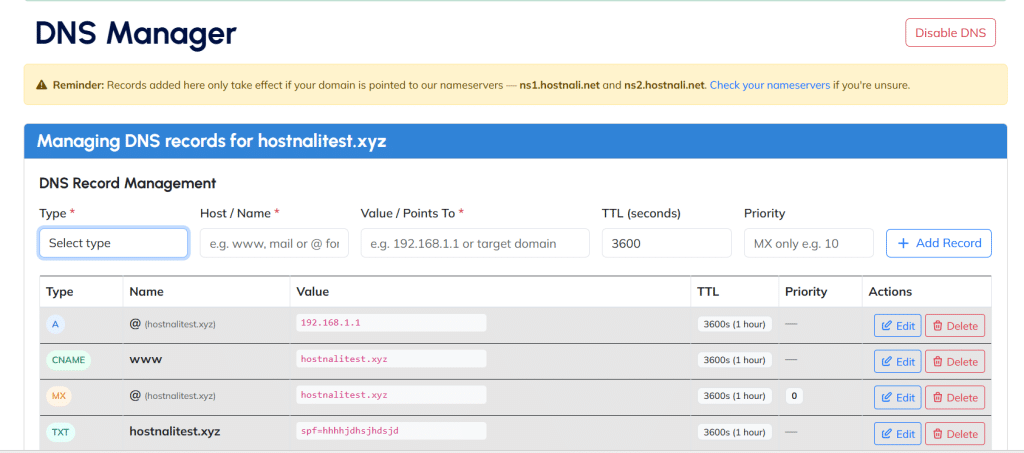
A multi-provider DNS management addon for WHMCS. Domain-only clients add A, AAAA, CNAME, MX and TXT records straight from your client area — no cPanel, no ticket, no waiting.

✓ One-time payment    ✓ No renewal fees    ✓ 10 DNS providers supported


yourdomain.com — zone file

; managed from WHMCS client area
@   A   91.200.176.13
www CNAME yourdomain.com
@   MX  10 mail.yourdomain.com
@   TXT “v=spf1 include:_spf…”
; saved by client — 0 tickets opened
● ZONE ACTIVE
propagated via Bunny DNS

About Multi-DNS Manager Pro - WHMCS Module

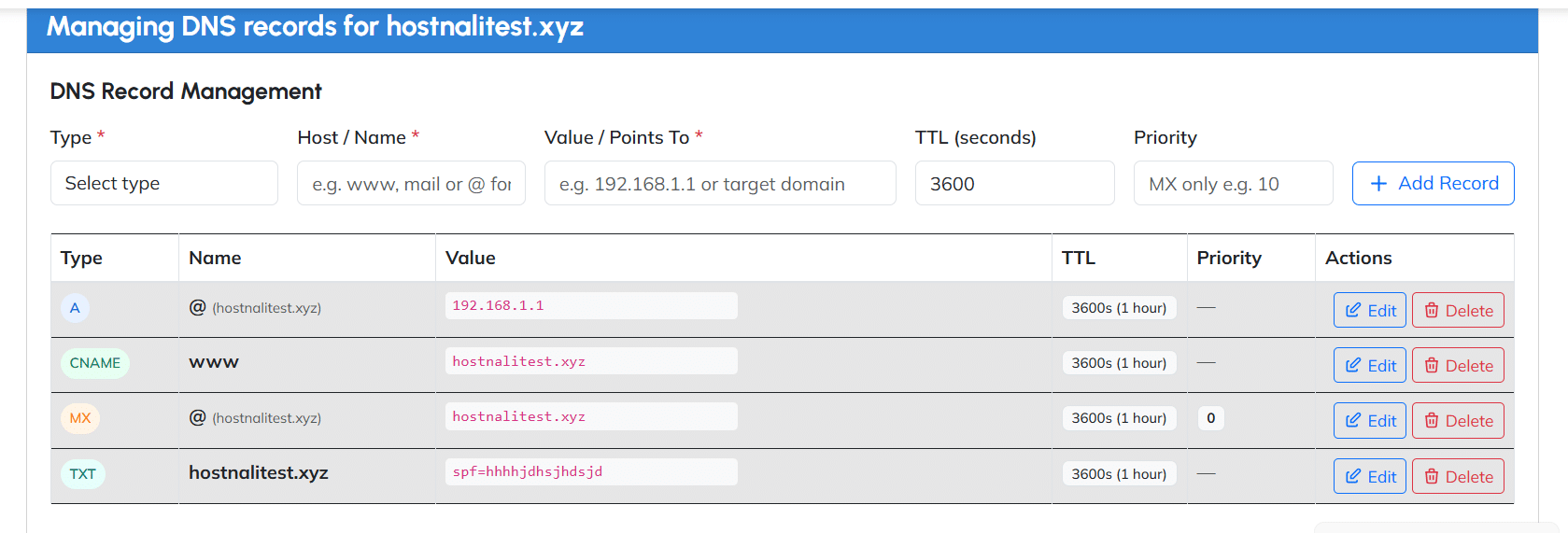
Multi-DNS Manager Pro is a WHMCS addon module built for hosting companies and domain resellers who want to give clients real DNS self-service — without building it themselves or locking into a single provider. Once installed, clients who register a domain through your WHMCS but don’t have an active hosting plan get access to a DNS Manager directly inside their client area, where they can enable DNS hosting and manage A, AAAA, CNAME, MX, and TXT records on their own, in real time.

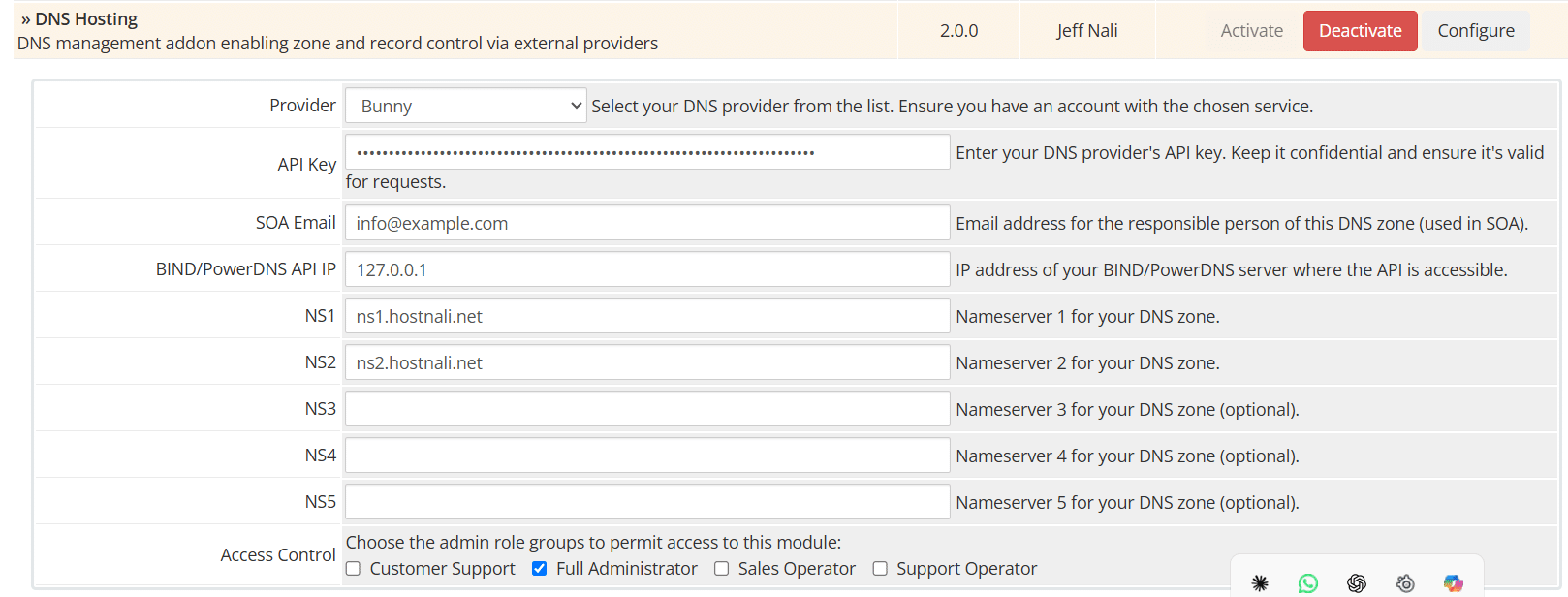
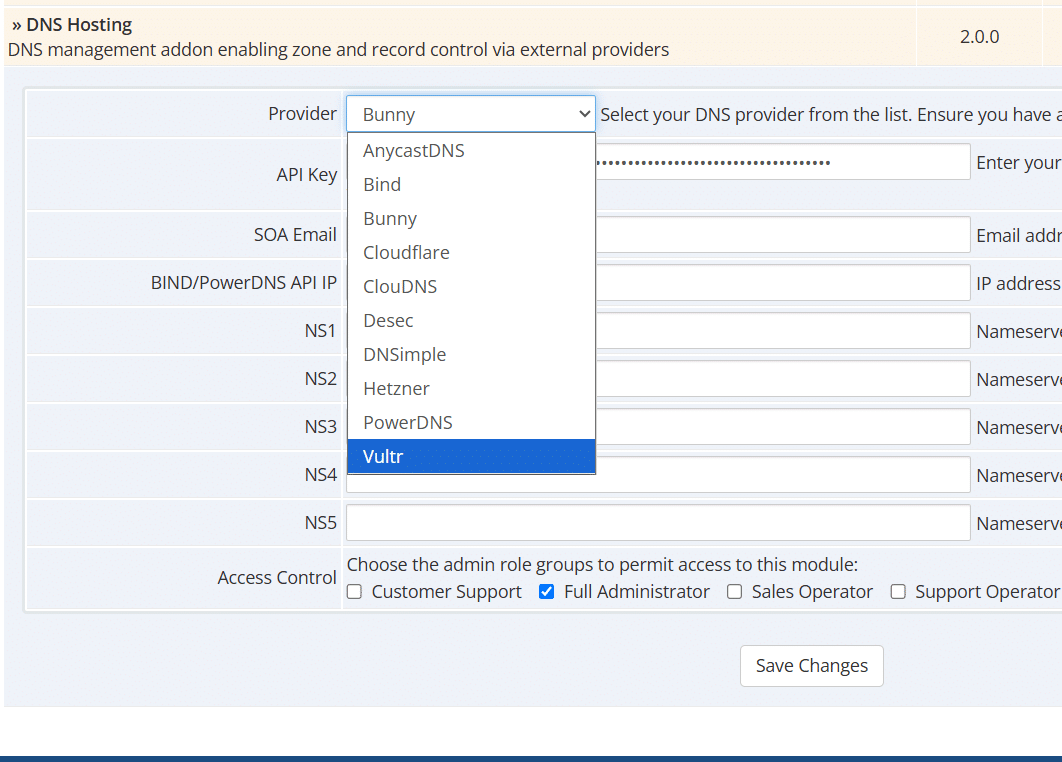
What sets this module apart from typical single-provider DNS addons is flexibility: it works with ten different DNS backends, including Cloudflare, Bunny DNS, PowerDNS, Vultr, Hetzner, ClouDNS, deSEC, DNSimple, Bind9, and AnycastDNS. You choose the provider that fits your infrastructure — whether that’s a managed service like Cloudflare or Bunny, or your own self-hosted PowerDNS or Bind9 cluster — and configure it once in the module settings. Every domain-only client then manages their DNS through that same backend, with no per-client setup required on your end.

Unlike many WHMCS modules that charge ongoing annual support or license renewal fees, Multi-DNS Manager Pro is sold as a one-time purchase. You install it, configure your provider and nameservers, and use it indefinitely across unlimited client domains — no recurring costs, no expiring license keys. For hosting companies tired of fielding manual DNS change tickets from clients who registered a domain but never bought hosting, this module turns that recurring support burden into a self-service feature your clients manage themselves.

Multi-DNS Manager Pro - WHMCS DNS Addon Module

THE PROBLEM

Domain-only clients shouldn't need a ticket to add an MX record

Right now, every DNS change for a client without hosting means you, manually, in your hosting dashboard, cpanel or direct admin, or whichever you use. Alternatively you have to ask the client each time to buy hosting which is frustrating to clients who want to just host dns records.

Support time, wasted

Every "can you point my domain to this IP" ticket is five minutes you're not getting back — multiplied by every client who registered a domain but skipped hosting.

No self-service today

WHMCS handles billing and domains beautifully — but gives domain-only clients nowhere to manage DNS unless they're also hosting with you.

Locked to one provider

Most DNS modules tie you to a single backend. If you run Bunny, Cloudflare, or your own PowerDNS cluster, you're stuck building it yourself.

PROVIDER STATUS

Works with the DNS backend you already run

Pick one provider in the module settings. Every domain-only client manages records through it — automatically.

CF
Cloudflare
● Supported
B
Bunny DNS
● Supported
PD
PowerDNS
● Supported
V
Vultr
● Supported
9
Bind9
● Supported
CL
ClouDNS
● Supported
DS
deSEC
● Supported
DN
DNSimple
● Supported
HZ
Hetzner
● Supported
AC
AnycastDNS
● Supported

10 providers · one module · switch anytime from module settings

SETUP

Live in four steps

No custom development. No per-client configuration.

01

Upload & activate

Drop the module into your WHMCS addons folder and activate it from System Settings.

02

Pick your provider

Choose Cloudflare, Bunny, PowerDNS or any of the 10 supported backends, then enter your API key.

03

Set your nameservers

Tell the module which nameservers your domain-only clients should point to.

04

Clients self-serve

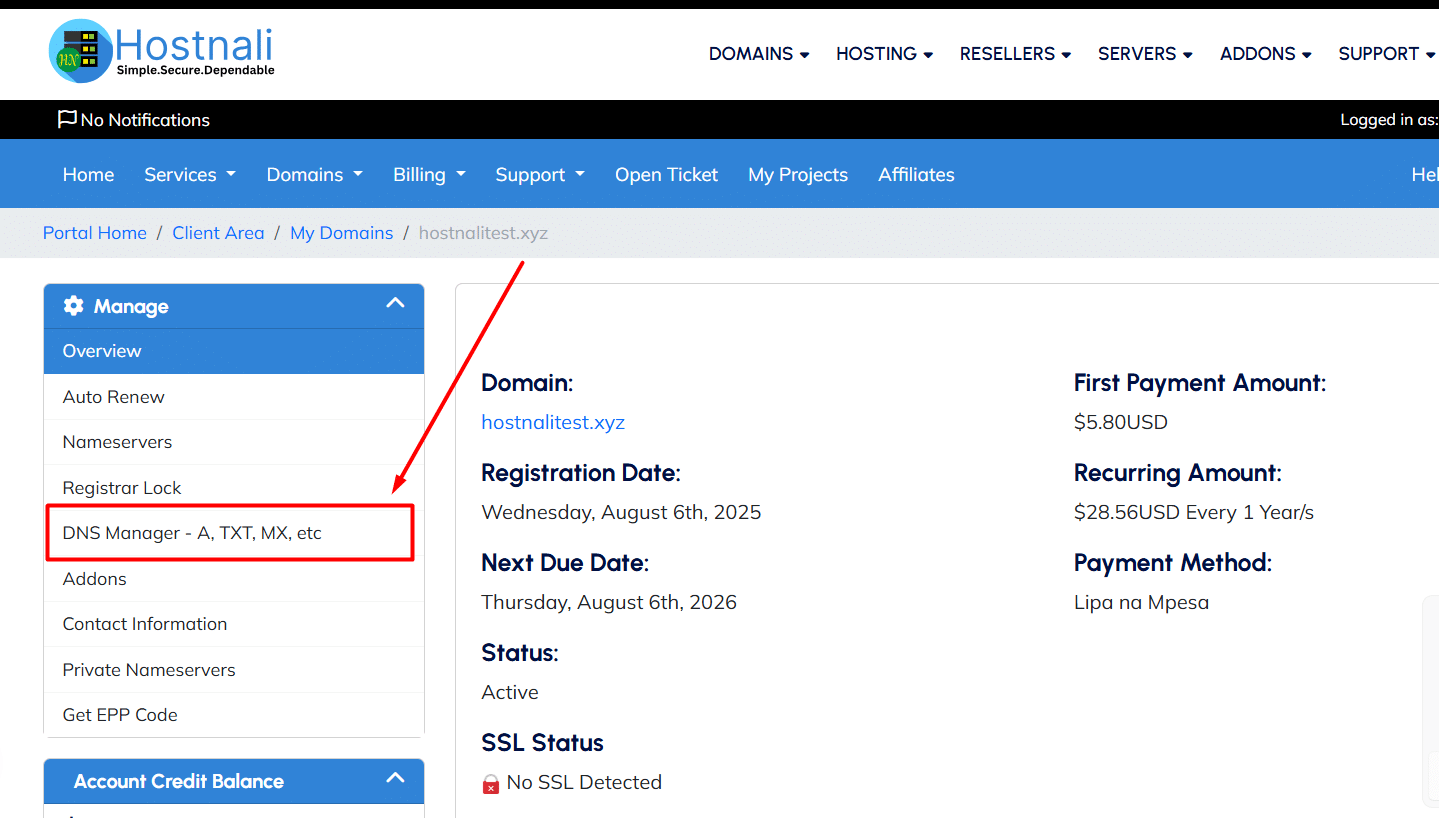
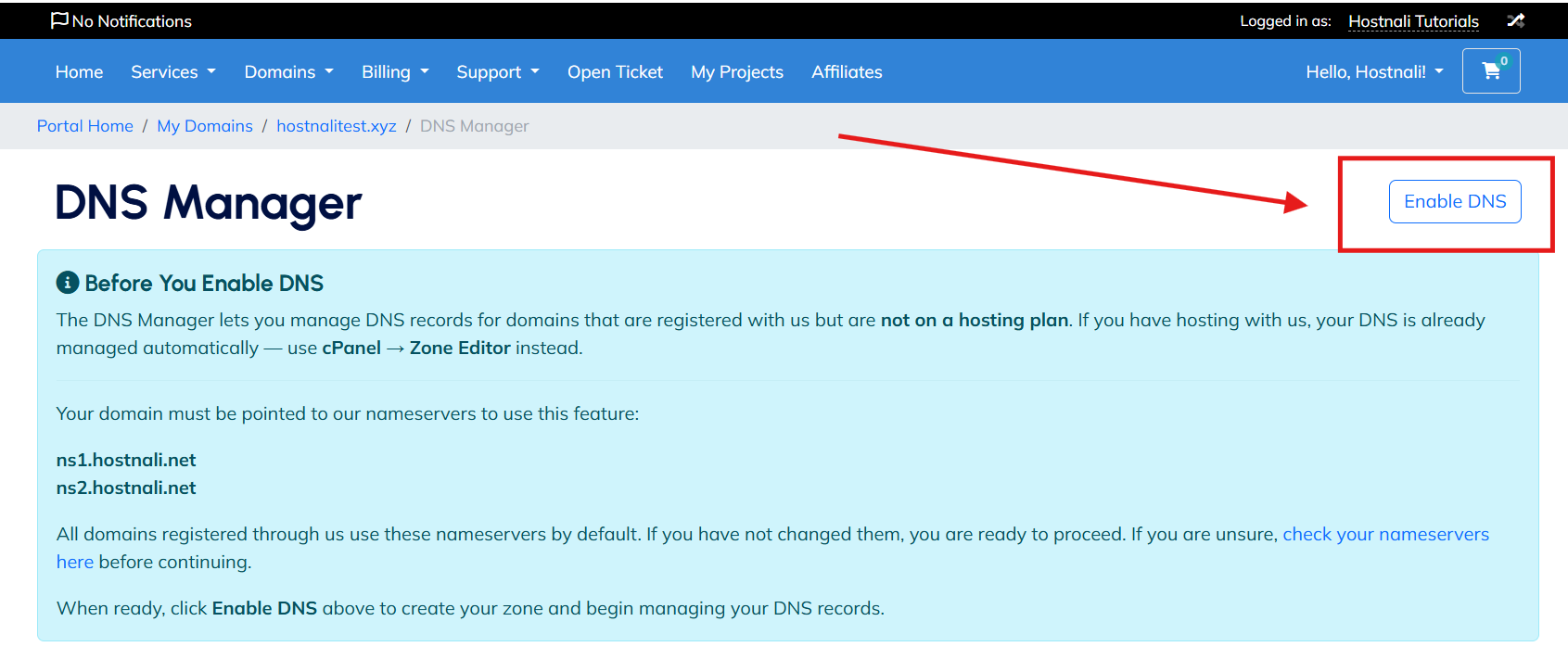
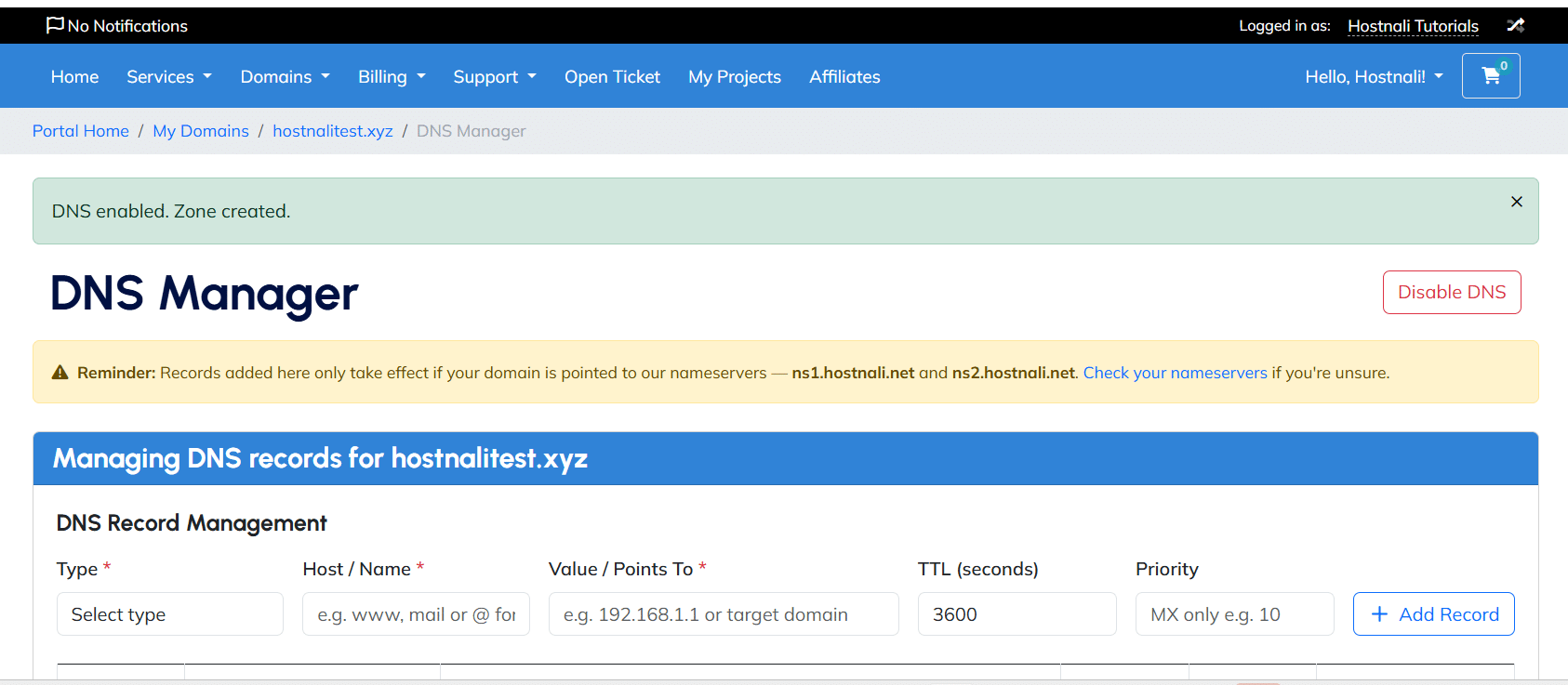
A “DNS Manager” link appears in their domain sidebar. They enable DNS and manage records themselves.

WHAT’S INCLUDED

Everything a domain-only client needs to manage DNS — nothing they don't.

  • Full record management

    A, AAAA, CNAME, MX and TXT — add, edit inline, and delete, all from the client area.

  • Per-client enable/disable

    Zones aren’t created automatically. Clients explicitly enable DNS for a domain — keeping things deliberate and clean.

  • Sits inside your existing domain page

    The DNS Manager link appears in the client’s domain management sidebar — no new navigation to learn.

  • Ownership-checked, every action

    Every add, edit, and delete verifies the domain belongs to the logged-in client before touching your DNS provider.

  • Switch providers without re-coding

    Running Bunny today and considering PowerDNS later? Change it in module settings — no rebuild.

PRICING

One payment. Yours forever.

No subscriptions, no annual support contracts, no per-domain fees.

MULTI-DNS MANAGER PRO
$49
or KSh 6,000

One-time purchase · lifetime use · install on unlimited WHMCS installations

  • Full module files + install guide
  • Support for all 10 DNS providers
  • Client-area DNS record manager (A, AAAA, CNAME, MX, TXT)
  • No recurring license or renewal fee
  • Use across unlimited client domains

FAQ

Before you install

Q. Does this work with my existing WHMCS theme?

Yes. The DNS Manager renders inside your standard client area template and inherits your existing styling.

Q. Can I switch DNS providers after installing?

Yes — change the provider and API key in module settings at any time. No code changes required.

Q. What PHP version do I need?

PHP 8.2 or 8.3, with the GMP extension enabled. Full setup steps are included in the install guide.

Q. Do hosting clients see this too?

It’s built for domain-only clients. Clients with active hosting are guided to manage DNS via cPanel instead.

Q. Is support included?

The one-time fee covers the module and install guide. Reach out directly for help beyond that.

Stop being your clients' DNS dashboard.

One module. Ten providers. Zero more “can you update my A record” tickets.

Our Customers Love Our Services